
10 Tutor Scheduling Software Tools for Tutors
10 Tutor Scheduling Software Tools for Tutors

Article by
Milo
ESL Content Coordinator & Educator
ESL Content Coordinator & Educator
All Posts
Table of Contents
A tutor may start the week with lessons recorded in Google Calendar, student availability buried in email, virtual meeting links in another app, cancellation notes in a spreadsheet, and payment reminders handled manually. Recurring sessions create even more work because a single change can affect a tutor, parent, student, room, invoice, and online classroom.
The best tutor scheduling software isn't necessarily the platform with the longest feature list. The better choice depends on team size, booking volume, lesson structure, billing requirements, reminder needs, and how much customization the business can maintain. A solo language tutor may need a polished booking link, while a tutoring center may need staff assignment, room capacity, attendance, invoicing, and teacher compensation in one operational record.
The comparison below evaluates each tool by the workflow it solves. Booking experience, recurring and group lessons, calendar support, payments, integrations, administrative depth, setup effort, limitations, and privacy implications all matter. The list includes options for independent tutors, K–12 educators, small academies, university instructors, and multi-tutor organizations.
1. Tutorbase
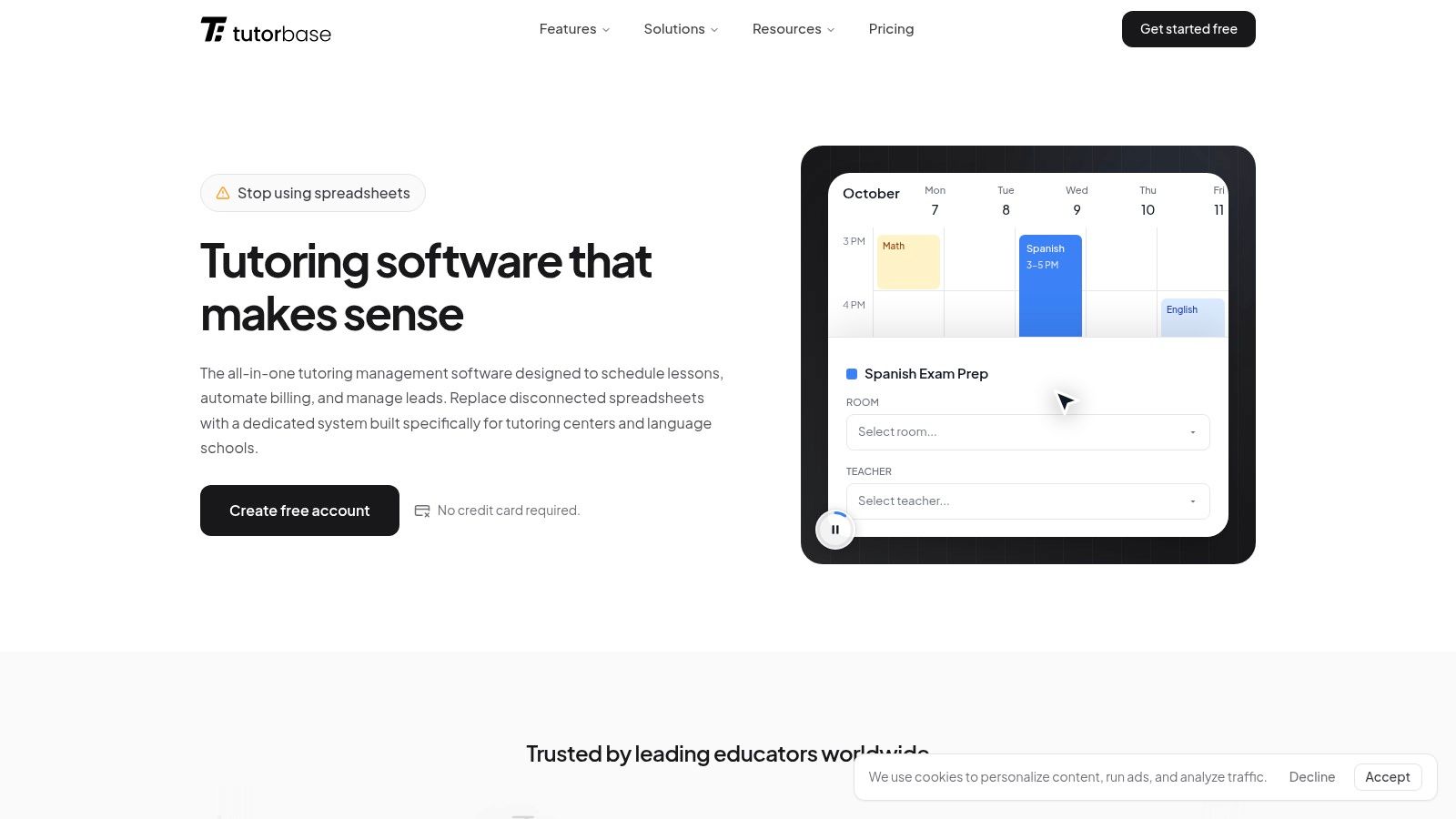
Tutorbase is designed for tutoring businesses that have outgrown disconnected calendars, spreadsheets, payment links, and messaging apps. It connects leads, students, payers, lessons, attendance, invoices, payments, teacher hours, compensation, communications, and family self-service in one system.
That connected workflow is its main distinction. A staff member can move from an enquiry to enrollment, schedule a recurring lesson, record attendance, generate the relevant invoice, reconcile payment, and prepare teacher compensation without copying information between separate tools. For a growing center, that reduces the risk of a scheduled lesson being absent from billing or a completed lesson being omitted from teacher pay.
Best for connected lesson operations
Tutorbase supports individual and group lessons, recurring schedules, online and in-person teaching, multiple teachers, locations, rooms, availability rules, conflict detection, capacity, and student-teacher matching. Families can use a branded portal to view lessons, request changes, cancel or reschedule where permitted, view balances, and pay online.
Stripe provides the payment infrastructure, while Tutorbase connects payments to the relevant payer, student, invoice, and outstanding balance. The platform also supports lesson-based and recurring billing, packages, prepaid plans, credits, refunds, and payment reminders. Teacher hours and gross compensation can be calculated from completed lesson records and configured terms, although this shouldn't be confused with statutory payroll or tax filing.
Practical rule: A tutoring center should choose Tutorbase when scheduling is only one part of the operational problem.
The trade-off is depth. An independent tutor who only needs a booking link and calendar sync may find a full tutoring operating system heavier than necessary. Setup also requires clear decisions about lesson types, cancellation rules, payer relationships, teacher rates, rooms, and permissions.
For centers, agencies, language schools, test-preparation businesses, music schools, after-school programs, and hybrid or multi-location organizations, the connected record is more valuable than a lightweight interface. Details about tutor scheduling and room booking explain how the scheduling workflow fits into the wider platform.
2. Notion For Teachers
Notion For Teachers suits tutors who want planning, student records, lesson notes, appointment tracking, and billing references in one flexible workspace rather than a specialized operations platform. The All-in-One Tutor Planner uses linked Notion pages and databases, so a student profile can connect to upcoming lessons, session notes, homework, attendance, progress, and invoice records.
That flexibility is useful when each tutor teaches differently. A private tutor can add fields for learning goals and preferred resources, while a small academy can create shared views for teachers, student records, and weekly schedules. The template is also easier to adapt than a rigid booking system because the workspace can be changed without rebuilding the entire business process.
Best for flexible planning and records
The strongest use case is a solo tutor or small team that wants lesson preparation and administration to sit together. Consistent session-note templates can make it easier to record what happened, what the student needs next, and which resources should be revisited. Calendar views also give tutors a practical overview of recurring appointments without maintaining separate lesson-planning documents.
Notion isn't a native payment processor, and it doesn't provide built-in automated SMS or email reminders in the way specialist schedulers do. Full automation may require Stripe, Zapier, Make, or manual updates. The setup also assumes some familiarity with Notion, and permissions need careful configuration before student or family information is shared.
This option works best when customization matters more than automated booking infrastructure. It isn't the strongest choice for a center that needs automatic room allocation, complex staff availability, attendance-driven invoicing, or payroll preparation. It is a strong planning layer for educators who need a linked workspace and are willing to manage the operational edges.
3. Calendly
Calendly is a strong fit for tutors who mainly need self-service booking. A tutor can publish separate event types for trial lessons, one-to-one sessions, parent meetings, recurring appointments, and group classes, then share the relevant link by email, website, or learning platform.
Calendar connections with Google and Outlook help protect existing availability, while integrations with Zoom, Google Meet, and Microsoft Teams can add virtual meeting details to confirmations. Tutors can also collect payment through Stripe or PayPal, with packages and invoicing available on paid tiers. Team features such as routing forms and round-robin assignment make it more useful when new enquiries need to reach the right tutor.
Where Calendly fits
The booking experience is familiar and quick for parents and students. It can also be embedded into a school website, and its broader integration ecosystem is useful when a tutoring business already uses a CRM, marketing platform, or workflow automation service.
The limitation is administrative depth. Calendly schedules appointments well, but it isn't a tutoring-specific record for attendance, lesson reports, teacher compensation, or family balances. Per-seat pricing can become less attractive as more tutors need individual access, and advanced routing and administration require higher tiers.
A solo tutor with a few lesson types will likely find the setup straightforward. A multi-tutor organization should define routing rules and ownership carefully before opening booking to the public. The platform can support the booking layer while a separate system manages student records and billing. Tutors building a wider acquisition process can also review this tutoring business website checklist alongside their booking setup. The official Calendly scheduling platform provides the product and integration details.
4. Acuity Scheduling
Acuity Scheduling is well suited to tutors who sell recurring packages, memberships, subscriptions, gift certificates, or lessons with deposits. Its intake forms can collect useful information before a first session, while waitlists and text reminders support practices with regular demand and a meaningful number of rescheduling requests.
The client-facing booking pages are polished and mobile-friendly. Zoom and Google Meet integrations cover common virtual teaching workflows, and the platform offers flexible charging options that can be useful for language tutors, music instructors, and enrichment providers selling lesson bundles rather than isolated appointments.
Strong package and payment handling
Acuity's main advantage is the relationship between appointment types and commercial rules. A tutor can structure a package or subscription workflow instead of sending separate payment instructions for every session. That reduces manual follow-up, although the business still needs a clear policy for unused sessions, cancellations, refunds, and package expiry.
There isn't a permanent free plan, so even a small tutor should test the recurring booking and payment process during the trial before committing. Some advanced capabilities, including HIPAA support with a business associate agreement, API access, custom CSS, and removal of platform branding, require higher plans. HIPAA support may matter to education or clinical organizations handling sensitive services, but it shouldn't be treated as a substitute for a complete privacy review.
Acuity is more capable than a basic calendar, but it remains primarily a scheduling and client-booking platform. A tutoring company that needs tutor payroll, detailed lesson reports, and operational student records may need another system alongside it. The Acuity Scheduling website outlines its current booking, payment, and integration options.
5. Setmore
Setmore offers a practical entry point for small tutoring teams that need online booking without a complicated rollout. Its free plan supports up to four users, making it relevant to a small academy with several tutors who share a limited schedule. Group and recurring appointments allow the system to cover more than one-off consultations.
Zoom setup is simple, and Google Meet support helps tutors run virtual lessons without creating meeting links manually each time. Payment connections include Stripe, Square, and PayPal, while QuickBooks, Mailchimp, and Zapier can connect the scheduler to other business processes.
Low-cost setup with clear boundaries
Setmore's reminder automation is useful for tutors who want confirmations and follow-ups handled automatically. SMS reminders and two-way calendar synchronization are available on the Pro plan, along with branding removal and additional controls. The distinction between plans matters because a free setup may look sufficient until a team needs accurate two-way availability or text messaging.
The platform is less suited to complex tutoring packages, detailed student progress records, or agency-level billing. A center can schedule classes and collect payments, but it may still need spreadsheets or another management system for lesson history, teacher compensation, and family account balances.
Setmore works when the core problem is getting a small group of tutors onto one booking page. It doesn't work as well when the business wants scheduling, attendance, invoicing, and staff operations to share one source of truth. The Setmore booking software site provides the current plan and integration information.
6. SimplyBook.me
SimplyBook.me is a configurable booking system for tutoring centers that need classes, client accounts, payment gateways, and optional features. Its class and event support makes it a better fit than a basic appointment scheduler for group revision sessions, workshops, or recurring cohorts.
The system supports Google and Outlook calendar synchronization, and Zoom or Google Meet connectivity can be handled natively or through Zapier. Payment coverage is broad, including Stripe, PayPal, Square, and regional gateways. Pricing is based on booking volume and included providers rather than charging for every staff member, which can suit a center with multiple tutors and controlled booking demand.
Modular features create both value and work
The custom-feature model lets a team enable only the capabilities it needs. A center can add client login, intake forms, memberships, or other functions as the workflow develops instead of adopting every feature immediately.
That modularity also creates configuration work. Administrators need to understand which add-ons are required, which features belong on higher tiers, and how booking rules interact with classes, payments, and staff availability. Some video integrations and HIPAA functionality require specific add-ons or higher plans.
SimplyBook.me is a reasonable middle ground for a growing center that wants more than individual appointments but isn't ready for tutoring-specific business software. It can support a broad operational surface, but the setup should be documented so that new staff don't accidentally change a feature that affects booking or payment behavior. The SimplyBook.me scheduling platform contains the current feature and plan details.
7. Appointy
Appointy stands out for tutoring operations that combine individual lessons, classes, rooms, and other physical resources. A private tutor can use individual appointment types, while a school department or small academy can allocate rooms and equipment alongside teacher availability.
Google Calendar synchronization, including two-way sync, helps keep personal and professional commitments aligned. Reserve with Google can provide another route for discovery and booking. Payment options include Stripe, PayPal, and Authorize.Net, with Zapier available for broader workflow connections.
Useful for rooms and in-person delivery
Resource allocation is the practical advantage. A tutoring center with a limited number of quiet rooms can treat those rooms as part of the booking logic instead of assuming that every open tutor slot is usable. That distinction matters for in-person teaching, where a technically available tutor may still lack an appropriate space.
The free plan is limited to one staff member, five services, and one hundred appointments per month, as specified in the product plan notes and Appointy's education scheduling information. Advanced controls for branding, SMS customization, and multiple locations appear at higher tiers. Heavy booking volume is also subject to a fair-usage policy, so a center should test its expected schedule before selecting a plan.
Appointy suits K–12 programs, departments, and private tutors that need resource management without adopting a full tutoring CRM. It isn't as deep as a tutoring-specific platform for payroll, progress records, or family billing.
8. Sign In Scheduling
Sign In Scheduling, formerly 10to8, is built for organizations where reminders, accessibility, and multiple locations matter as much as the booking page. Email, SMS, and voice reminders can support students and parents who may not reliably respond to one communication channel. Zoom integration can add meeting links to confirmations for virtual appointments.
The platform also connects with Sign In App's visitor-management environment. That makes it more relevant to tutoring centers, schools, and institutions with reception or front-desk processes than to a solo tutor working from home.
A stronger institutional fit
Accessibility is a meaningful consideration. The booking pages are positioned around WCAG support, while the broader compliance posture references HIPAA, GDPR, and ISO 27001. These references should prompt a proper review of the organization's own obligations, data processing terms, retention policies, and configuration. A compliance label alone doesn't determine whether a particular tutoring workflow is appropriate.
The principal drawback is commercial transparency. Public self-serve pricing isn't available, so a center needs to contact sales and clarify user, location, reminder, integration, and visitor-management costs. Some teams may also pay for capabilities they won't use.
Sign In Scheduling is most suitable for multi-site tutoring programs, school-linked services, and organizations focused on reducing missed appointments through layered reminders. Teams designing broader outreach can pair the operational workflow with this guide to outreach automation for tutors and consultants. The official Sign In Scheduling platform provides the current product information.
9. TutorCruncher
TutorCruncher is built around the operating realities of a multi-tutor tutoring business. It combines lesson scheduling, attendance, tutor and client portals, invoicing, payroll workflows, progress reporting, and payment handling. That makes it a stronger candidate than general appointment software for agencies that need to reconcile what was scheduled, what was delivered, what the client owes, and what the tutor should receive.
Conflict checks and centralized lesson records help coordinators manage recurring schedules across multiple tutors. Client and tutor portals can reduce routine messages, while lesson reports and progress tracking give families more context than a simple appointment confirmation. Online lesson recording and API access are available for organizations with more advanced requirements.
Built for business administration
The trade-off is complexity. A solo tutor who only wants parents to choose an open slot may find the interface and configuration heavier than needed. Staff need to establish rates, payment rules, cancellation policies, roles, and reporting practices before the platform can produce reliable operational data.
Pricing includes a base fee plus percentage or transaction fees depending on payment type, so the total cost should be assessed against lesson value and payment volume rather than the subscription alone. US-based organizations may find the ACH and card payment handling particularly relevant, but every business should confirm regional availability and terms.
TutorCruncher is a strong choice for agencies and growing tutoring companies that need tutoring-specific billing and tutor workflows. It can be less attractive for educators who prefer a flexible planner or a lightweight booking link. Teams comparing invoicing processes can also use this guide on invoicing for private tutoring. The TutorCruncher platform documents its business features.
10. Teachworks
Teachworks focuses on tutoring companies with many students and teachers. Drag-and-drop scheduling, conflict checks, open lessons, website booking widgets, family accounts, lesson notes, invoicing, payment handling, and payroll tracking all support a repeatable tutoring-office workflow.
The platform allows unlimited students and teachers on all plans, while the pricing model combines a monthly base with a per-lesson fee. That structure can be cost-effective for organizations that need many user records, but the per-lesson charge needs attention when the business delivers a high volume of lower-value sessions.
Efficient for coordinators
Teachworks prioritizes administrative control over consumer-style design. A coordinator can manage teacher availability and lesson changes from a central schedule, while families can use accounts and booking widgets rather than relying entirely on email. Higher-tier integrations and API access can connect the system to other tools when the standard workflow isn't enough.
The main limitation is cost predictability at high session volume. A business should model how per-lesson fees behave across individual, group, cancelled, rescheduled, and complimentary sessions before adopting the platform. The interface may also feel less polished to families than a dedicated consumer booking tool, although the administrative workflow is the priority.
Teachworks is a good fit for a tutoring center that wants purpose-built scheduling and billing without paying separately for every staff account. It is less suitable for a solo tutor seeking the fastest possible setup. The Teachworks tutoring software site provides current information about its plans and features.
11. TutorBird
TutorBird is a focused option for private tutors and small centers that want scheduling, attendance, invoicing, messaging, reminders, progress notes, and file sharing in one relatively focused platform. The calendar supports recurring lessons and rescheduling, while two-way calendar synchronization helps tutors avoid conflicts with personal commitments.
Automatic invoicing and online payments reduce the need to maintain a separate payment tracker. Bulk email and SMS can help a tutor communicate with families, and multi-tutor support includes roles, permissions, and payroll tracking. That combination gives small teams more structure than a basic booking app without requiring the operational depth of a larger agency platform.
Fast setup for essential tutoring work
TutorBird's strongest appeal is simplicity. Its all-features-included positioning, 30-day free trial, and 90-day money-back guarantee make it easier for a tutor or small center to test the complete workflow before committing. The platform is focused on tutoring essentials, which can shorten implementation for teams that don't need complex routing or multi-location administration.
The limitation is extensibility. TutorBird offers fewer enterprise-grade integrations than generalist schedulers, and it is less flexible than TutorCruncher or Teachworks for complex agency structures. A center with unusual billing rules, extensive API requirements, or advanced staff allocation should test those workflows directly.
TutorBird is a sensible middle option for K–12 tutors, extracurricular educators, and small centers that need more than appointment booking but less than a large operational platform. The TutorBird scheduling and management platform provides the current product details.
Top 11 Tutor Scheduling Software Comparison
Tool | Core features | Target audience | Unique selling points | Pricing |
|---|---|---|---|---|
Tutorbase | CRM, scheduling, attendance, automated invoicing, Stripe payments, teacher compensation, parent/student portal, automation | Tutoring centers, agencies, multi-teacher schools, growing businesses | All-in-one tutoring OS with connected workflows and AI-native automation | Paid, scalable SaaS plans (contact) |
Notion For Teachers, The All‑in‑One Tutor Planner | Notion template: scheduling, student profiles, lesson notes, lesson tracking, invoice tracking | Freelance tutors, small academies, Notion users | Highly customizable teacher-focused workspace; easy to duplicate and adapt | Paid one-time template (Notion account required) |
Calendly | One-click booking, team/round-robin, payments (Stripe/PayPal), calendar & video integrations | Solo tutors to small teams needing simple self-service booking | Fast, familiar booking UX with broad integrations and easy embedding | Free tier; paid per-seat tiers |
Acuity Scheduling (by Squarespace) | Scheduling, memberships/packages, subscriptions, SMS/email reminders, intake forms, Zoom | Solo tutors and multi-tutor practices selling packages/subscriptions | Strong payments/memberships support, gift cards, HIPAA option | Paid plans (trial only) |
Setmore | Booking pages, Zoom integration, payments (Stripe/Square/PayPal), automated reminders | Small tutoring teams and budget-conscious tutors | Generous free plan (up to 4 users), simple Zoom setup, multiple payment options | Free tier; affordable Pro plan |
SimplyBook.me | Classes/events, client login/app, many payment gateways, calendar sync, modular add-ons | Multi-tutor centers, education and clinic users | Flat pricing by booking volume, deep payment support, purpose-built classes feature | Volume-based paid plans |
Appointy (Education) | Class and resource scheduling, two-way Google Calendar sync, Reserve with Google, payments | K–12 departments, tutoring centers needing room/resource allocation | Education-focused features, resource allocation, clear tiering | Tiered plans; 14-day free trial |
Sign In Scheduling (formerly 10to8) | Multi-location booking, branded pages, automated email/SMS/voice reminders, Zoom | Multi-site institutions, schools and clinics with reception/visitor flows | Accessibility (WCAG), compliance focus (HIPAA/GDPR/ISO), visitor-management integration | Sales-led pricing (contact sales) |
TutorCruncher | Centralized scheduling, attendance, client/tutor portals, invoicing, payroll, reporting | Multi-tutor agencies and growing tutoring companies | Built around real tutoring ops with robust billing and reporting | Paid, base fee plus transaction/percentage fees |
Teachworks | Drag-and-drop scheduling, family accounts, invoicing, lesson notes, payroll tracking | Companies with many students and teachers | Purpose-built tutoring workflows, predictable admin pricing, unlimited users | Paid, base + per-lesson fees (can scale cost-effectively) |
TutorBird | Scheduling & attendance, automated reminders, invoicing, messaging, progress notes | Private tutors, small centers, extracurricular tutors | Affordable all-in-one with quick setup and simple interface | Affordable subscription; free trial and money-back guarantee |
Build a Reliable Tutoring Operations Stack
The right tool depends on the operational bottleneck, not the number of features displayed on a pricing page. A solo tutor who mainly needs availability, reminders, virtual meeting links, and payments should start with a lightweight scheduler. Calendly, Setmore, Acuity Scheduling, and Appointy each serve that category, with different strengths around integrations, packages, rooms, classes, and payment options.
A tutoring business with several teachers needs a different standard. Tutorbase, TutorCruncher, Teachworks, and TutorBird are more relevant when the workflow includes attendance, family accounts, lesson notes, billing, teacher rates, compensation, and operational reporting. The difference is important because a booking can exist without a completed lesson, and a completed lesson can be missed by invoicing unless those records connect.
Notion For Teachers is the better fit for educators who want linked planning, student profiles, notes, progress tracking, appointment views, and administrative records in a customizable workspace. It offers control and adaptability, but it requires manual processes or integrations for native payment collection and automated reminders. It should be treated as a flexible planning and record-keeping layer rather than a complete scheduling, billing, or student-information system.
Before implementation, a tutoring team should:
Define lesson types: Separate trials, one-to-one lessons, group classes, assessments, parent meetings, and recurring programs.
Set cancellation rules: Decide minimum notice, rescheduling permissions, no-show handling, package usage, and refund treatment before opening bookings.
Connect only necessary calendars: Start with the calendars that control availability, then test conflicts and recurring events.
Test payment flows: Run a parent or student booking from start to finish, including payment, confirmation, cancellation, refund, and invoice status.
Standardize session notes: Use consistent fields for attendance, lesson content, homework, progress, safeguarding concerns, and next steps where appropriate.
Assign permissions deliberately: Teachers, coordinators, parents, and students shouldn't automatically see the same records.
Review room capacity: An open tutor slot isn't usable if no suitable room, equipment, accessibility accommodation, or substitute coverage exists.
Choose a record boundary: Decide whether sensitive student information belongs in the scheduler, a dedicated student-record system, a secure school platform, or a restricted Notion workspace.
Privacy needs to be part of procurement, not an afterthought. Teams should minimize collected data, restrict shared pages, review staff permissions regularly, confirm vendor security documentation, understand retention and deletion controls, and check relevant contractual or regulatory requirements. A scheduling tool shouldn't be treated as a complete student-record system unless its protections and obligations have been reviewed for the actual tutoring context.
Tutoring businesses can begin by mapping one complete workflow, from enquiry or booking through attendance, payment, lesson notes, and follow-up. The team should then test that workflow in two or three shortlisted platforms with real lesson types and realistic cancellation scenarios. The tool that leaves the fewest manual handoffs, unclear permissions, and duplicate records is usually the better long-term choice, even if another platform has a longer feature list.
Tutors and tutoring teams should choose a platform this week by documenting their lesson types, recurring schedule rules, payment process, reminder channels, staff roles, and student-data boundaries. A short trial with a real parent booking, a rescheduled lesson, an attendance record, and an invoice will reveal more than a product demonstration. After that test, select the system that makes delivered teaching, paid work, and the next administrative action visible in one dependable workflow.
A tutor may start the week with lessons recorded in Google Calendar, student availability buried in email, virtual meeting links in another app, cancellation notes in a spreadsheet, and payment reminders handled manually. Recurring sessions create even more work because a single change can affect a tutor, parent, student, room, invoice, and online classroom.
The best tutor scheduling software isn't necessarily the platform with the longest feature list. The better choice depends on team size, booking volume, lesson structure, billing requirements, reminder needs, and how much customization the business can maintain. A solo language tutor may need a polished booking link, while a tutoring center may need staff assignment, room capacity, attendance, invoicing, and teacher compensation in one operational record.
The comparison below evaluates each tool by the workflow it solves. Booking experience, recurring and group lessons, calendar support, payments, integrations, administrative depth, setup effort, limitations, and privacy implications all matter. The list includes options for independent tutors, K–12 educators, small academies, university instructors, and multi-tutor organizations.
1. Tutorbase
Tutorbase is designed for tutoring businesses that have outgrown disconnected calendars, spreadsheets, payment links, and messaging apps. It connects leads, students, payers, lessons, attendance, invoices, payments, teacher hours, compensation, communications, and family self-service in one system.
That connected workflow is its main distinction. A staff member can move from an enquiry to enrollment, schedule a recurring lesson, record attendance, generate the relevant invoice, reconcile payment, and prepare teacher compensation without copying information between separate tools. For a growing center, that reduces the risk of a scheduled lesson being absent from billing or a completed lesson being omitted from teacher pay.
Best for connected lesson operations
Tutorbase supports individual and group lessons, recurring schedules, online and in-person teaching, multiple teachers, locations, rooms, availability rules, conflict detection, capacity, and student-teacher matching. Families can use a branded portal to view lessons, request changes, cancel or reschedule where permitted, view balances, and pay online.
Stripe provides the payment infrastructure, while Tutorbase connects payments to the relevant payer, student, invoice, and outstanding balance. The platform also supports lesson-based and recurring billing, packages, prepaid plans, credits, refunds, and payment reminders. Teacher hours and gross compensation can be calculated from completed lesson records and configured terms, although this shouldn't be confused with statutory payroll or tax filing.
Practical rule: A tutoring center should choose Tutorbase when scheduling is only one part of the operational problem.
The trade-off is depth. An independent tutor who only needs a booking link and calendar sync may find a full tutoring operating system heavier than necessary. Setup also requires clear decisions about lesson types, cancellation rules, payer relationships, teacher rates, rooms, and permissions.
For centers, agencies, language schools, test-preparation businesses, music schools, after-school programs, and hybrid or multi-location organizations, the connected record is more valuable than a lightweight interface. Details about tutor scheduling and room booking explain how the scheduling workflow fits into the wider platform.
2. Notion For Teachers
Notion For Teachers suits tutors who want planning, student records, lesson notes, appointment tracking, and billing references in one flexible workspace rather than a specialized operations platform. The All-in-One Tutor Planner uses linked Notion pages and databases, so a student profile can connect to upcoming lessons, session notes, homework, attendance, progress, and invoice records.
That flexibility is useful when each tutor teaches differently. A private tutor can add fields for learning goals and preferred resources, while a small academy can create shared views for teachers, student records, and weekly schedules. The template is also easier to adapt than a rigid booking system because the workspace can be changed without rebuilding the entire business process.
Best for flexible planning and records
The strongest use case is a solo tutor or small team that wants lesson preparation and administration to sit together. Consistent session-note templates can make it easier to record what happened, what the student needs next, and which resources should be revisited. Calendar views also give tutors a practical overview of recurring appointments without maintaining separate lesson-planning documents.
Notion isn't a native payment processor, and it doesn't provide built-in automated SMS or email reminders in the way specialist schedulers do. Full automation may require Stripe, Zapier, Make, or manual updates. The setup also assumes some familiarity with Notion, and permissions need careful configuration before student or family information is shared.
This option works best when customization matters more than automated booking infrastructure. It isn't the strongest choice for a center that needs automatic room allocation, complex staff availability, attendance-driven invoicing, or payroll preparation. It is a strong planning layer for educators who need a linked workspace and are willing to manage the operational edges.
3. Calendly
Calendly is a strong fit for tutors who mainly need self-service booking. A tutor can publish separate event types for trial lessons, one-to-one sessions, parent meetings, recurring appointments, and group classes, then share the relevant link by email, website, or learning platform.
Calendar connections with Google and Outlook help protect existing availability, while integrations with Zoom, Google Meet, and Microsoft Teams can add virtual meeting details to confirmations. Tutors can also collect payment through Stripe or PayPal, with packages and invoicing available on paid tiers. Team features such as routing forms and round-robin assignment make it more useful when new enquiries need to reach the right tutor.
Where Calendly fits
The booking experience is familiar and quick for parents and students. It can also be embedded into a school website, and its broader integration ecosystem is useful when a tutoring business already uses a CRM, marketing platform, or workflow automation service.
The limitation is administrative depth. Calendly schedules appointments well, but it isn't a tutoring-specific record for attendance, lesson reports, teacher compensation, or family balances. Per-seat pricing can become less attractive as more tutors need individual access, and advanced routing and administration require higher tiers.
A solo tutor with a few lesson types will likely find the setup straightforward. A multi-tutor organization should define routing rules and ownership carefully before opening booking to the public. The platform can support the booking layer while a separate system manages student records and billing. Tutors building a wider acquisition process can also review this tutoring business website checklist alongside their booking setup. The official Calendly scheduling platform provides the product and integration details.
4. Acuity Scheduling
Acuity Scheduling is well suited to tutors who sell recurring packages, memberships, subscriptions, gift certificates, or lessons with deposits. Its intake forms can collect useful information before a first session, while waitlists and text reminders support practices with regular demand and a meaningful number of rescheduling requests.
The client-facing booking pages are polished and mobile-friendly. Zoom and Google Meet integrations cover common virtual teaching workflows, and the platform offers flexible charging options that can be useful for language tutors, music instructors, and enrichment providers selling lesson bundles rather than isolated appointments.
Strong package and payment handling
Acuity's main advantage is the relationship between appointment types and commercial rules. A tutor can structure a package or subscription workflow instead of sending separate payment instructions for every session. That reduces manual follow-up, although the business still needs a clear policy for unused sessions, cancellations, refunds, and package expiry.
There isn't a permanent free plan, so even a small tutor should test the recurring booking and payment process during the trial before committing. Some advanced capabilities, including HIPAA support with a business associate agreement, API access, custom CSS, and removal of platform branding, require higher plans. HIPAA support may matter to education or clinical organizations handling sensitive services, but it shouldn't be treated as a substitute for a complete privacy review.
Acuity is more capable than a basic calendar, but it remains primarily a scheduling and client-booking platform. A tutoring company that needs tutor payroll, detailed lesson reports, and operational student records may need another system alongside it. The Acuity Scheduling website outlines its current booking, payment, and integration options.
5. Setmore
Setmore offers a practical entry point for small tutoring teams that need online booking without a complicated rollout. Its free plan supports up to four users, making it relevant to a small academy with several tutors who share a limited schedule. Group and recurring appointments allow the system to cover more than one-off consultations.
Zoom setup is simple, and Google Meet support helps tutors run virtual lessons without creating meeting links manually each time. Payment connections include Stripe, Square, and PayPal, while QuickBooks, Mailchimp, and Zapier can connect the scheduler to other business processes.
Low-cost setup with clear boundaries
Setmore's reminder automation is useful for tutors who want confirmations and follow-ups handled automatically. SMS reminders and two-way calendar synchronization are available on the Pro plan, along with branding removal and additional controls. The distinction between plans matters because a free setup may look sufficient until a team needs accurate two-way availability or text messaging.
The platform is less suited to complex tutoring packages, detailed student progress records, or agency-level billing. A center can schedule classes and collect payments, but it may still need spreadsheets or another management system for lesson history, teacher compensation, and family account balances.
Setmore works when the core problem is getting a small group of tutors onto one booking page. It doesn't work as well when the business wants scheduling, attendance, invoicing, and staff operations to share one source of truth. The Setmore booking software site provides the current plan and integration information.
6. SimplyBook.me
SimplyBook.me is a configurable booking system for tutoring centers that need classes, client accounts, payment gateways, and optional features. Its class and event support makes it a better fit than a basic appointment scheduler for group revision sessions, workshops, or recurring cohorts.
The system supports Google and Outlook calendar synchronization, and Zoom or Google Meet connectivity can be handled natively or through Zapier. Payment coverage is broad, including Stripe, PayPal, Square, and regional gateways. Pricing is based on booking volume and included providers rather than charging for every staff member, which can suit a center with multiple tutors and controlled booking demand.
Modular features create both value and work
The custom-feature model lets a team enable only the capabilities it needs. A center can add client login, intake forms, memberships, or other functions as the workflow develops instead of adopting every feature immediately.
That modularity also creates configuration work. Administrators need to understand which add-ons are required, which features belong on higher tiers, and how booking rules interact with classes, payments, and staff availability. Some video integrations and HIPAA functionality require specific add-ons or higher plans.
SimplyBook.me is a reasonable middle ground for a growing center that wants more than individual appointments but isn't ready for tutoring-specific business software. It can support a broad operational surface, but the setup should be documented so that new staff don't accidentally change a feature that affects booking or payment behavior. The SimplyBook.me scheduling platform contains the current feature and plan details.
7. Appointy
Appointy stands out for tutoring operations that combine individual lessons, classes, rooms, and other physical resources. A private tutor can use individual appointment types, while a school department or small academy can allocate rooms and equipment alongside teacher availability.
Google Calendar synchronization, including two-way sync, helps keep personal and professional commitments aligned. Reserve with Google can provide another route for discovery and booking. Payment options include Stripe, PayPal, and Authorize.Net, with Zapier available for broader workflow connections.
Useful for rooms and in-person delivery
Resource allocation is the practical advantage. A tutoring center with a limited number of quiet rooms can treat those rooms as part of the booking logic instead of assuming that every open tutor slot is usable. That distinction matters for in-person teaching, where a technically available tutor may still lack an appropriate space.
The free plan is limited to one staff member, five services, and one hundred appointments per month, as specified in the product plan notes and Appointy's education scheduling information. Advanced controls for branding, SMS customization, and multiple locations appear at higher tiers. Heavy booking volume is also subject to a fair-usage policy, so a center should test its expected schedule before selecting a plan.
Appointy suits K–12 programs, departments, and private tutors that need resource management without adopting a full tutoring CRM. It isn't as deep as a tutoring-specific platform for payroll, progress records, or family billing.
8. Sign In Scheduling
Sign In Scheduling, formerly 10to8, is built for organizations where reminders, accessibility, and multiple locations matter as much as the booking page. Email, SMS, and voice reminders can support students and parents who may not reliably respond to one communication channel. Zoom integration can add meeting links to confirmations for virtual appointments.
The platform also connects with Sign In App's visitor-management environment. That makes it more relevant to tutoring centers, schools, and institutions with reception or front-desk processes than to a solo tutor working from home.
A stronger institutional fit
Accessibility is a meaningful consideration. The booking pages are positioned around WCAG support, while the broader compliance posture references HIPAA, GDPR, and ISO 27001. These references should prompt a proper review of the organization's own obligations, data processing terms, retention policies, and configuration. A compliance label alone doesn't determine whether a particular tutoring workflow is appropriate.
The principal drawback is commercial transparency. Public self-serve pricing isn't available, so a center needs to contact sales and clarify user, location, reminder, integration, and visitor-management costs. Some teams may also pay for capabilities they won't use.
Sign In Scheduling is most suitable for multi-site tutoring programs, school-linked services, and organizations focused on reducing missed appointments through layered reminders. Teams designing broader outreach can pair the operational workflow with this guide to outreach automation for tutors and consultants. The official Sign In Scheduling platform provides the current product information.
9. TutorCruncher
TutorCruncher is built around the operating realities of a multi-tutor tutoring business. It combines lesson scheduling, attendance, tutor and client portals, invoicing, payroll workflows, progress reporting, and payment handling. That makes it a stronger candidate than general appointment software for agencies that need to reconcile what was scheduled, what was delivered, what the client owes, and what the tutor should receive.
Conflict checks and centralized lesson records help coordinators manage recurring schedules across multiple tutors. Client and tutor portals can reduce routine messages, while lesson reports and progress tracking give families more context than a simple appointment confirmation. Online lesson recording and API access are available for organizations with more advanced requirements.
Built for business administration
The trade-off is complexity. A solo tutor who only wants parents to choose an open slot may find the interface and configuration heavier than needed. Staff need to establish rates, payment rules, cancellation policies, roles, and reporting practices before the platform can produce reliable operational data.
Pricing includes a base fee plus percentage or transaction fees depending on payment type, so the total cost should be assessed against lesson value and payment volume rather than the subscription alone. US-based organizations may find the ACH and card payment handling particularly relevant, but every business should confirm regional availability and terms.
TutorCruncher is a strong choice for agencies and growing tutoring companies that need tutoring-specific billing and tutor workflows. It can be less attractive for educators who prefer a flexible planner or a lightweight booking link. Teams comparing invoicing processes can also use this guide on invoicing for private tutoring. The TutorCruncher platform documents its business features.
10. Teachworks
Teachworks focuses on tutoring companies with many students and teachers. Drag-and-drop scheduling, conflict checks, open lessons, website booking widgets, family accounts, lesson notes, invoicing, payment handling, and payroll tracking all support a repeatable tutoring-office workflow.
The platform allows unlimited students and teachers on all plans, while the pricing model combines a monthly base with a per-lesson fee. That structure can be cost-effective for organizations that need many user records, but the per-lesson charge needs attention when the business delivers a high volume of lower-value sessions.
Efficient for coordinators
Teachworks prioritizes administrative control over consumer-style design. A coordinator can manage teacher availability and lesson changes from a central schedule, while families can use accounts and booking widgets rather than relying entirely on email. Higher-tier integrations and API access can connect the system to other tools when the standard workflow isn't enough.
The main limitation is cost predictability at high session volume. A business should model how per-lesson fees behave across individual, group, cancelled, rescheduled, and complimentary sessions before adopting the platform. The interface may also feel less polished to families than a dedicated consumer booking tool, although the administrative workflow is the priority.
Teachworks is a good fit for a tutoring center that wants purpose-built scheduling and billing without paying separately for every staff account. It is less suitable for a solo tutor seeking the fastest possible setup. The Teachworks tutoring software site provides current information about its plans and features.
11. TutorBird
TutorBird is a focused option for private tutors and small centers that want scheduling, attendance, invoicing, messaging, reminders, progress notes, and file sharing in one relatively focused platform. The calendar supports recurring lessons and rescheduling, while two-way calendar synchronization helps tutors avoid conflicts with personal commitments.
Automatic invoicing and online payments reduce the need to maintain a separate payment tracker. Bulk email and SMS can help a tutor communicate with families, and multi-tutor support includes roles, permissions, and payroll tracking. That combination gives small teams more structure than a basic booking app without requiring the operational depth of a larger agency platform.
Fast setup for essential tutoring work
TutorBird's strongest appeal is simplicity. Its all-features-included positioning, 30-day free trial, and 90-day money-back guarantee make it easier for a tutor or small center to test the complete workflow before committing. The platform is focused on tutoring essentials, which can shorten implementation for teams that don't need complex routing or multi-location administration.
The limitation is extensibility. TutorBird offers fewer enterprise-grade integrations than generalist schedulers, and it is less flexible than TutorCruncher or Teachworks for complex agency structures. A center with unusual billing rules, extensive API requirements, or advanced staff allocation should test those workflows directly.
TutorBird is a sensible middle option for K–12 tutors, extracurricular educators, and small centers that need more than appointment booking but less than a large operational platform. The TutorBird scheduling and management platform provides the current product details.
Top 11 Tutor Scheduling Software Comparison
Tool | Core features | Target audience | Unique selling points | Pricing |
|---|---|---|---|---|
Tutorbase | CRM, scheduling, attendance, automated invoicing, Stripe payments, teacher compensation, parent/student portal, automation | Tutoring centers, agencies, multi-teacher schools, growing businesses | All-in-one tutoring OS with connected workflows and AI-native automation | Paid, scalable SaaS plans (contact) |
Notion For Teachers, The All‑in‑One Tutor Planner | Notion template: scheduling, student profiles, lesson notes, lesson tracking, invoice tracking | Freelance tutors, small academies, Notion users | Highly customizable teacher-focused workspace; easy to duplicate and adapt | Paid one-time template (Notion account required) |
Calendly | One-click booking, team/round-robin, payments (Stripe/PayPal), calendar & video integrations | Solo tutors to small teams needing simple self-service booking | Fast, familiar booking UX with broad integrations and easy embedding | Free tier; paid per-seat tiers |
Acuity Scheduling (by Squarespace) | Scheduling, memberships/packages, subscriptions, SMS/email reminders, intake forms, Zoom | Solo tutors and multi-tutor practices selling packages/subscriptions | Strong payments/memberships support, gift cards, HIPAA option | Paid plans (trial only) |
Setmore | Booking pages, Zoom integration, payments (Stripe/Square/PayPal), automated reminders | Small tutoring teams and budget-conscious tutors | Generous free plan (up to 4 users), simple Zoom setup, multiple payment options | Free tier; affordable Pro plan |
SimplyBook.me | Classes/events, client login/app, many payment gateways, calendar sync, modular add-ons | Multi-tutor centers, education and clinic users | Flat pricing by booking volume, deep payment support, purpose-built classes feature | Volume-based paid plans |
Appointy (Education) | Class and resource scheduling, two-way Google Calendar sync, Reserve with Google, payments | K–12 departments, tutoring centers needing room/resource allocation | Education-focused features, resource allocation, clear tiering | Tiered plans; 14-day free trial |
Sign In Scheduling (formerly 10to8) | Multi-location booking, branded pages, automated email/SMS/voice reminders, Zoom | Multi-site institutions, schools and clinics with reception/visitor flows | Accessibility (WCAG), compliance focus (HIPAA/GDPR/ISO), visitor-management integration | Sales-led pricing (contact sales) |
TutorCruncher | Centralized scheduling, attendance, client/tutor portals, invoicing, payroll, reporting | Multi-tutor agencies and growing tutoring companies | Built around real tutoring ops with robust billing and reporting | Paid, base fee plus transaction/percentage fees |
Teachworks | Drag-and-drop scheduling, family accounts, invoicing, lesson notes, payroll tracking | Companies with many students and teachers | Purpose-built tutoring workflows, predictable admin pricing, unlimited users | Paid, base + per-lesson fees (can scale cost-effectively) |
TutorBird | Scheduling & attendance, automated reminders, invoicing, messaging, progress notes | Private tutors, small centers, extracurricular tutors | Affordable all-in-one with quick setup and simple interface | Affordable subscription; free trial and money-back guarantee |
Build a Reliable Tutoring Operations Stack
The right tool depends on the operational bottleneck, not the number of features displayed on a pricing page. A solo tutor who mainly needs availability, reminders, virtual meeting links, and payments should start with a lightweight scheduler. Calendly, Setmore, Acuity Scheduling, and Appointy each serve that category, with different strengths around integrations, packages, rooms, classes, and payment options.
A tutoring business with several teachers needs a different standard. Tutorbase, TutorCruncher, Teachworks, and TutorBird are more relevant when the workflow includes attendance, family accounts, lesson notes, billing, teacher rates, compensation, and operational reporting. The difference is important because a booking can exist without a completed lesson, and a completed lesson can be missed by invoicing unless those records connect.
Notion For Teachers is the better fit for educators who want linked planning, student profiles, notes, progress tracking, appointment views, and administrative records in a customizable workspace. It offers control and adaptability, but it requires manual processes or integrations for native payment collection and automated reminders. It should be treated as a flexible planning and record-keeping layer rather than a complete scheduling, billing, or student-information system.
Before implementation, a tutoring team should:
Define lesson types: Separate trials, one-to-one lessons, group classes, assessments, parent meetings, and recurring programs.
Set cancellation rules: Decide minimum notice, rescheduling permissions, no-show handling, package usage, and refund treatment before opening bookings.
Connect only necessary calendars: Start with the calendars that control availability, then test conflicts and recurring events.
Test payment flows: Run a parent or student booking from start to finish, including payment, confirmation, cancellation, refund, and invoice status.
Standardize session notes: Use consistent fields for attendance, lesson content, homework, progress, safeguarding concerns, and next steps where appropriate.
Assign permissions deliberately: Teachers, coordinators, parents, and students shouldn't automatically see the same records.
Review room capacity: An open tutor slot isn't usable if no suitable room, equipment, accessibility accommodation, or substitute coverage exists.
Choose a record boundary: Decide whether sensitive student information belongs in the scheduler, a dedicated student-record system, a secure school platform, or a restricted Notion workspace.
Privacy needs to be part of procurement, not an afterthought. Teams should minimize collected data, restrict shared pages, review staff permissions regularly, confirm vendor security documentation, understand retention and deletion controls, and check relevant contractual or regulatory requirements. A scheduling tool shouldn't be treated as a complete student-record system unless its protections and obligations have been reviewed for the actual tutoring context.
Tutoring businesses can begin by mapping one complete workflow, from enquiry or booking through attendance, payment, lesson notes, and follow-up. The team should then test that workflow in two or three shortlisted platforms with real lesson types and realistic cancellation scenarios. The tool that leaves the fewest manual handoffs, unclear permissions, and duplicate records is usually the better long-term choice, even if another platform has a longer feature list.
Tutors and tutoring teams should choose a platform this week by documenting their lesson types, recurring schedule rules, payment process, reminder channels, staff roles, and student-data boundaries. A short trial with a real parent booking, a rescheduled lesson, an attendance record, and an invoice will reveal more than a product demonstration. After that test, select the system that makes delivered teaching, paid work, and the next administrative action visible in one dependable workflow.
Table of Contents



Notion4Teachers
Notion templates to simplify administrative tasks and enhance your teaching experience.



2026 Notion4Teachers. All Rights Reserved.
Notion4Teachers
Notion templates to simplify administrative tasks and enhance your teaching experience.
2026 Notion4Teachers. All Rights Reserved.
Notion4Teachers
Notion templates to simplify administrative tasks and enhance your teaching experience.
2026 Notion4Teachers. All Rights Reserved.