A shadow worth pausing for: my Seedance 3.0 lesson on changing light

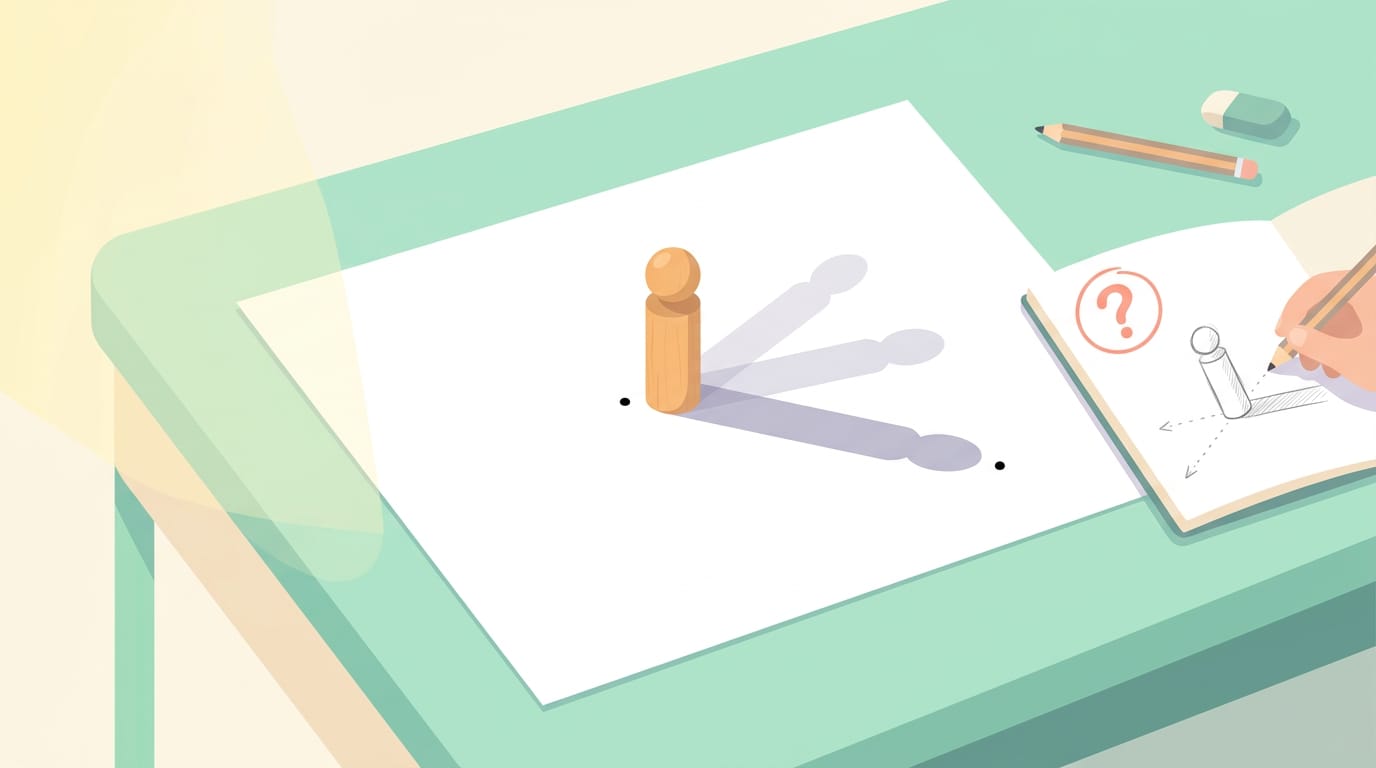
I want to give a class a puzzle they can solve before anyone raises a hand. On a white sheet stands a wooden peg. Its shadow grows longer, yet the peg never moves. At the end of the clip I plan to freeze the picture and ask students to draw where they think the lamp has gone. That small pause is the reason for making a video at all. A finished diagram reveals both the answer and the question at the same time.
My teacher planner needs just three items for this lesson. One is a photograph of the real arrangement. Another is a quiet clip of the shadow changing. The third is a second view that reveals the lamp. I will keep them together on one Notion page so the reveal does not accidentally appear on the projector while the class is still guessing. A separate teacher note records what moved and what remained fixed.
Ultimate Teacher Planner
The ultimate all-in-one education management system in Notion.

Work backwards from the pencil drawing
For a student's drawing to be meaningful, there must be a reliable place from which to measure the shadow. I plan to stick a small black dot at the base of the peg and a second dot a short distance away on the sheet. The second dot is a reference mark rather than the intended answer. A shadow that crosses it gives students a common moment to discuss even when they describe its length using different words.
Inside the lesson, Seedance 3.0 has a very particular assignment. I want a simple image-to-video study in which the wooden peg stays upright while its shadow travels across the white surface. A still photo sets the peg, the two dots and the margin of the paper in position. A brief recording of a real lamp moving lower on one side supplies the motion reference. My written note asks for the lamp to remain outside the crop in this first view.
I will first shoot the real demonstration with the phone propped against a box. The frame should include the whole shadow at its longest, with room for a viewer to see where it ends. If I discover that the table edge cuts the tip off, I can move the peg before photographing the reference. Changing the reference on the table is easier than trying to repair the missing tip after the sequence has been edited.
Hide one thing and tell the truth about the rest
The mystery depends on hiding the lamp, not on hiding what kind of picture students are seeing. I will describe the short generated segment as an illustration and keep the practical footage for comparison. Seedance 3.0 can help present the movement in a clear frame, but it cannot serve as evidence that a physical setup behaved in a particular way. The real setup is simple enough to reproduce on a desk after the clip has played.
My first prompt will focus on the tip of the shadow moving away from the peg in one continuous direction. I want the light and dark boundary to remain visible without giving the peg a second shadow. If a generated take shows two distinct shadows near the end, I will look at the practical reference before changing the prompt. A second lamp in the room might be contributing a faint edge to the real recording as well.
If the real recording shows one shadow and the illustration shows two, I can tighten the Seedance 3.0 brief around a single light source. I will also simplify the frame by moving the box that props up the camera out of the reflected light. If a later take still changes the orientation of the peg, the practical clip can carry the lesson on its own. An interesting mistake can become a separate question once the class understands the original one.
Give the pause a home in the planner
On my Notion page the student-facing block will contain the clip without its reveal. Directly below it I will place a still of the final frame and a short drawing prompt. The teacher-facing note can hold the side view and a reminder to ask for a reason before inviting anyone to move the real lamp. That arrangement gives another teacher enough context to repeat the activity without having to search through a folder of nearly identical video files.
A resource note beside the editable storyboard will point to seedance pricing for a colleague who wants to make a different illustration with the same kit. Reusing the finished clip costs no new generation work, and the paper-and-peg demonstration is available at any time. Knowing which part actually needs a new take makes it easier to spend a small class budget on the materials that pupils can handle themselves.
For the reveal I will cut to a much wider view recorded from the side. It shows the bottom of the lamp moving lower while the peg and the paper remain fixed. I can put the earlier Seedance 3.0 frame in the corner for a few seconds so students can match the long shadow with the low lamp. The two black dots stay visible in both views, turning the change of camera angle into something the class can follow.
I want to end with a question that needs an experiment, not another screening. If the peg stands on a thicker book, which part of the setup should the class hold constant to make a useful comparison? Students can mark their prediction on paper, move one object and look. The finished Seedance 3.0 film has done its work when the projector can go dark and the conversation continues around the actual lamp.
Before sharing the page I will preview it as a student and test the pause on a classroom-sized display. The dot at the peg's base should be easy to find from the back row, the shadow tip should remain on the paper, and the reveal should stay out of sight until someone asks for it. Those little details make the difference between a clip that fills forty seconds and a clip that starts a lesson.
Ultimate Teacher Planner
The ultimate all-in-one education management system in Notion.