
Personalised Tote Bags for Teachers: A Practical Buying Guide
Personalised Tote Bags for Teachers: A Practical Buying Guide

Article by
Milo
ESL Content Coordinator & Educator
ESL Content Coordinator & Educator
All Posts

You reach into your tote for a marker before a lesson and find a bent worksheet and spare chargers instead. Before replacing the bag, check what you're carrying and where each item belongs.
Still grading everything by hand?
EMStudio is a free teaching management app — manage your classes, students, lessons, and more!
Learn More

Still grading everything by hand?
EMStudio is a free teaching management app — manage your classes, students, lessons, and more!
Learn More
Table of Contents
Start with what you carry each day
Before shopping, check what travels with you. That list will help you decide how much space you need and whether your current bag could work with a different arrangement.
Empty it first. Tip everything out onto a table at home. Remove old handouts, dried-out whiteboard markers and anything else you no longer use. Lay out the remaining contents so you can see what needs to go back.
Separate daily from occasional items. Sort what remains into three piles: daily essentials, materials for the next lesson, and supplies that can stay in school if your workplace allows it. A planner and a pen pouch usually belong in the first pile. A box of counters for one maths lesson belongs in the second. Keep occasional teaching materials separate so you can remove them when that lesson is over.
Make a short packing list. Write down the daily pile. An example might include a folder for marking, a planner, a laptop if your school expects one, a small charger pouch, a pen pouch and personal essentials such as keys, wallet and water bottle. Yours may be shorter. You can adapt a reusable supply checklist into a list of what needs to travel with you tomorrow. Its reusable format lets you adjust the contents to suit your lessons.
Now pack your current bag using only the list and carry it for a week. If the folder stays flat, the laptop and its sleeve fit, and you can find your keys without digging, you may not need a new tote. If something doesn't work, note the problem before shopping, such as an opening that's too narrow or handles that feel uncomfortable under load.
Check the tote before adding your initials
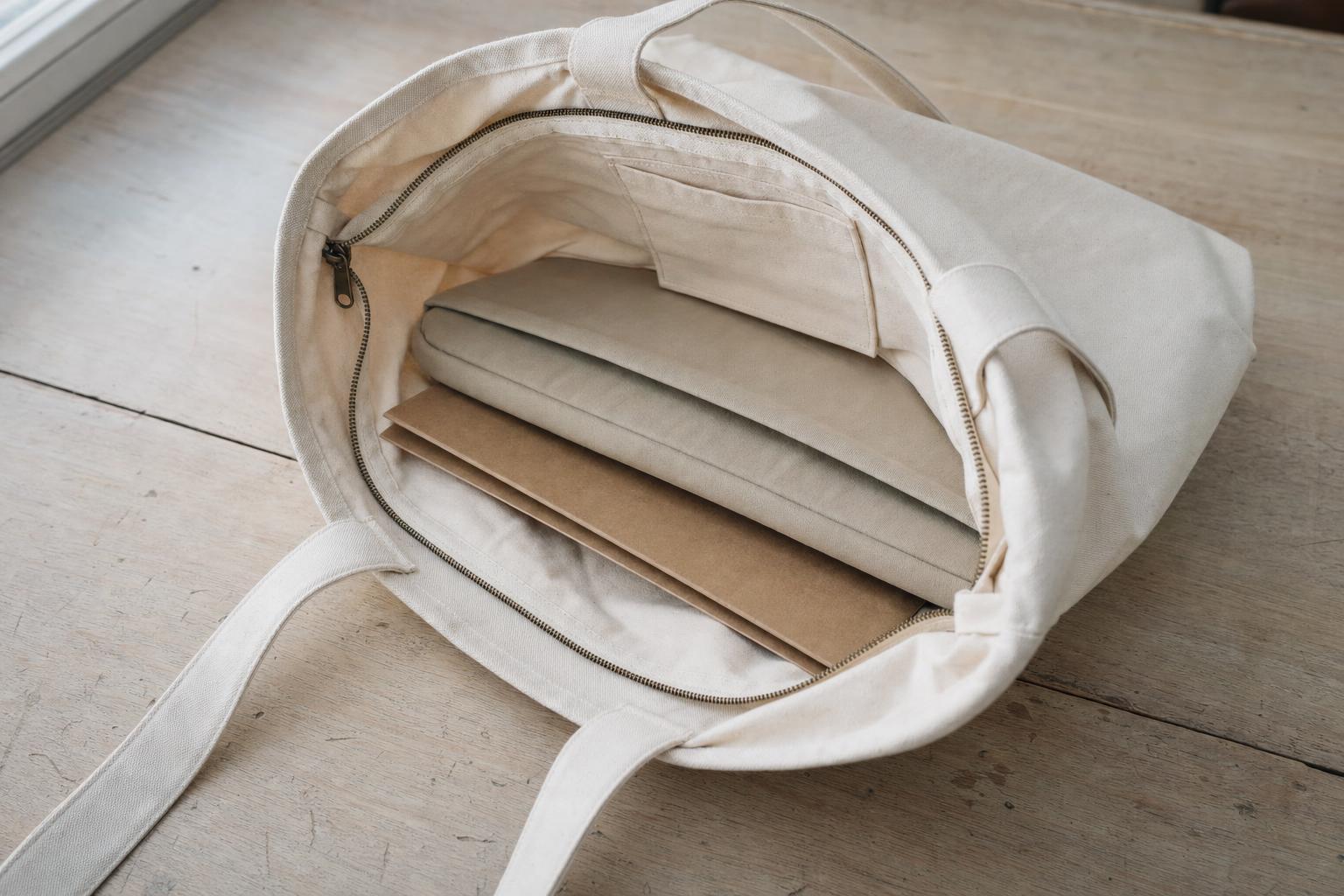
Check the measurements, storage and care requirements of the exact model you plan to personalise.
Test the fit. Measure your actual folder and laptop sleeve in centimetres and compare them with the listed bag dimensions. Then look at the opening, because a bag can be wide at the base and narrow at the top. If you can try it in person, load it with your real items and carry it as you would on the way to school. Paper is heavy, and a tote that feels comfortable empty can dig into your shoulder with a week of marking inside.
Check the pockets and closure. Read the specification line by line. Check the closure type, the number of inside pockets and whether a laptop size is stated. A laptop-size claim doesn't establish that a bag has a padded compartment. If you want padding, look for an explicit specification or check that your own sleeve fits. If there's only one flat inside pocket, pouches can keep other small items together.
Read the material and care details. Check what "canvas" means for the model you're considering. Some canvas totes are recycled polyester and others are cotton, and their care instructions differ. Note whether spot cleaning is recommended, and avoid machine washing unless the label allows it. Read the care instructions before buying and check them again before cleaning up a spill.
Once the size and layout work for your school day, you can think about the finish. Longchamp's My Pliage range of personalized canvas bags starts from seven models, each made to order in France on canvas made from 100% recycled polyester. The L Tote was listed at S$545.00 on 16 October 2026, and other models are priced separately. Check each model's specifications on its own listing before choosing.
Review the custom order. Before paying, check the spelling and placement in the preview, the exact model selected and the final price. Check the return terms for personalised items and the delivery estimate for your chosen model before planning around the start of term.
Give every item a fixed place
A bag with one inside pocket can still be orderly if you group small items and use the same arrangement each day.
Group small items. Separate pouches by category keep a single-pocket bag manageable. Try one for stationery, one for cables and the charger, and one for personal items. Keep papers together in the folder. Give keys a consistent spot, such as the flat pocket, and return them there each time. Pouches you already own are enough to try this arrangement. An organiser insert is optional; check that it fits alongside your belongings and leaves enough room for the bag to close. Add the categories and fit checks you want to repeat to your packing list.
Reset before tomorrow. Each evening, take out marked papers and materials needed for only one lesson. Repack from your list, returning keys and pouches to their usual places. Add any materials for the next day's lessons rather than leaving occasional supplies in the bag.
Conclusion
A practical tote starts with the items you carry, not the initials on the outside. Measure your folder and sleeve, check the closure and care instructions, then test a simple pouch routine before ordering. Personalisation can add a finishing touch once the layout works.
FAQs
Do I need an organiser insert?
Not necessarily. Separate pouches may be enough to keep stationery, cables and personal items organised. If you add an insert, check that your folder and laptop sleeve still fit and that the bag closes with everything inside.
Can I put it in the washing machine?
Follow the care instructions for your exact bag, and use a washing machine only if they explicitly allow it.
Should I use my full name or initials?
Initials show less personal information, while a full name can make it easier for colleagues to identify the owner. Check which options your chosen model supports, then review the spelling and placement in the order preview before confirming.
Does personalisation add storage?
No. Initials change the bag's appearance only. They do not add pockets, padding or capacity, so check the exact model's layout and dimensions separately.
Start with what you carry each day
Before shopping, check what travels with you. That list will help you decide how much space you need and whether your current bag could work with a different arrangement.
Empty it first. Tip everything out onto a table at home. Remove old handouts, dried-out whiteboard markers and anything else you no longer use. Lay out the remaining contents so you can see what needs to go back.
Separate daily from occasional items. Sort what remains into three piles: daily essentials, materials for the next lesson, and supplies that can stay in school if your workplace allows it. A planner and a pen pouch usually belong in the first pile. A box of counters for one maths lesson belongs in the second. Keep occasional teaching materials separate so you can remove them when that lesson is over.
Make a short packing list. Write down the daily pile. An example might include a folder for marking, a planner, a laptop if your school expects one, a small charger pouch, a pen pouch and personal essentials such as keys, wallet and water bottle. Yours may be shorter. You can adapt a reusable supply checklist into a list of what needs to travel with you tomorrow. Its reusable format lets you adjust the contents to suit your lessons.
Now pack your current bag using only the list and carry it for a week. If the folder stays flat, the laptop and its sleeve fit, and you can find your keys without digging, you may not need a new tote. If something doesn't work, note the problem before shopping, such as an opening that's too narrow or handles that feel uncomfortable under load.
Check the tote before adding your initials
Check the measurements, storage and care requirements of the exact model you plan to personalise.
Test the fit. Measure your actual folder and laptop sleeve in centimetres and compare them with the listed bag dimensions. Then look at the opening, because a bag can be wide at the base and narrow at the top. If you can try it in person, load it with your real items and carry it as you would on the way to school. Paper is heavy, and a tote that feels comfortable empty can dig into your shoulder with a week of marking inside.
Check the pockets and closure. Read the specification line by line. Check the closure type, the number of inside pockets and whether a laptop size is stated. A laptop-size claim doesn't establish that a bag has a padded compartment. If you want padding, look for an explicit specification or check that your own sleeve fits. If there's only one flat inside pocket, pouches can keep other small items together.
Read the material and care details. Check what "canvas" means for the model you're considering. Some canvas totes are recycled polyester and others are cotton, and their care instructions differ. Note whether spot cleaning is recommended, and avoid machine washing unless the label allows it. Read the care instructions before buying and check them again before cleaning up a spill.
Once the size and layout work for your school day, you can think about the finish. Longchamp's My Pliage range of personalized canvas bags starts from seven models, each made to order in France on canvas made from 100% recycled polyester. The L Tote was listed at S$545.00 on 16 October 2026, and other models are priced separately. Check each model's specifications on its own listing before choosing.
Review the custom order. Before paying, check the spelling and placement in the preview, the exact model selected and the final price. Check the return terms for personalised items and the delivery estimate for your chosen model before planning around the start of term.
Give every item a fixed place
A bag with one inside pocket can still be orderly if you group small items and use the same arrangement each day.
Group small items. Separate pouches by category keep a single-pocket bag manageable. Try one for stationery, one for cables and the charger, and one for personal items. Keep papers together in the folder. Give keys a consistent spot, such as the flat pocket, and return them there each time. Pouches you already own are enough to try this arrangement. An organiser insert is optional; check that it fits alongside your belongings and leaves enough room for the bag to close. Add the categories and fit checks you want to repeat to your packing list.
Reset before tomorrow. Each evening, take out marked papers and materials needed for only one lesson. Repack from your list, returning keys and pouches to their usual places. Add any materials for the next day's lessons rather than leaving occasional supplies in the bag.
Conclusion
A practical tote starts with the items you carry, not the initials on the outside. Measure your folder and sleeve, check the closure and care instructions, then test a simple pouch routine before ordering. Personalisation can add a finishing touch once the layout works.
FAQs
Do I need an organiser insert?
Not necessarily. Separate pouches may be enough to keep stationery, cables and personal items organised. If you add an insert, check that your folder and laptop sleeve still fit and that the bag closes with everything inside.
Can I put it in the washing machine?
Follow the care instructions for your exact bag, and use a washing machine only if they explicitly allow it.
Should I use my full name or initials?
Initials show less personal information, while a full name can make it easier for colleagues to identify the owner. Check which options your chosen model supports, then review the spelling and placement in the order preview before confirming.
Does personalisation add storage?
No. Initials change the bag's appearance only. They do not add pockets, padding or capacity, so check the exact model's layout and dimensions separately.
Still grading everything by hand?
EMStudio is a free teaching management app — manage your classes, students, lessons, and more!
Learn More
Still grading everything by hand?
EMStudio is a free teaching management app — manage your classes, students, lessons, and more!
Learn More




Notion4Teachers
Notion templates to simplify administrative tasks and enhance your teaching experience.



2026 Notion4Teachers. All Rights Reserved.
Notion4Teachers
Notion templates to simplify administrative tasks and enhance your teaching experience.
2026 Notion4Teachers. All Rights Reserved.
Notion4Teachers
Notion templates to simplify administrative tasks and enhance your teaching experience.
2026 Notion4Teachers. All Rights Reserved.