
Using Cloud Storage in Education: Better Organization for Teachers and Students
Using Cloud Storage in Education: Better Organization for Teachers and Students

Article by
Milo
ESL Content Coordinator & Educator
ESL Content Coordinator & Educator
All Posts
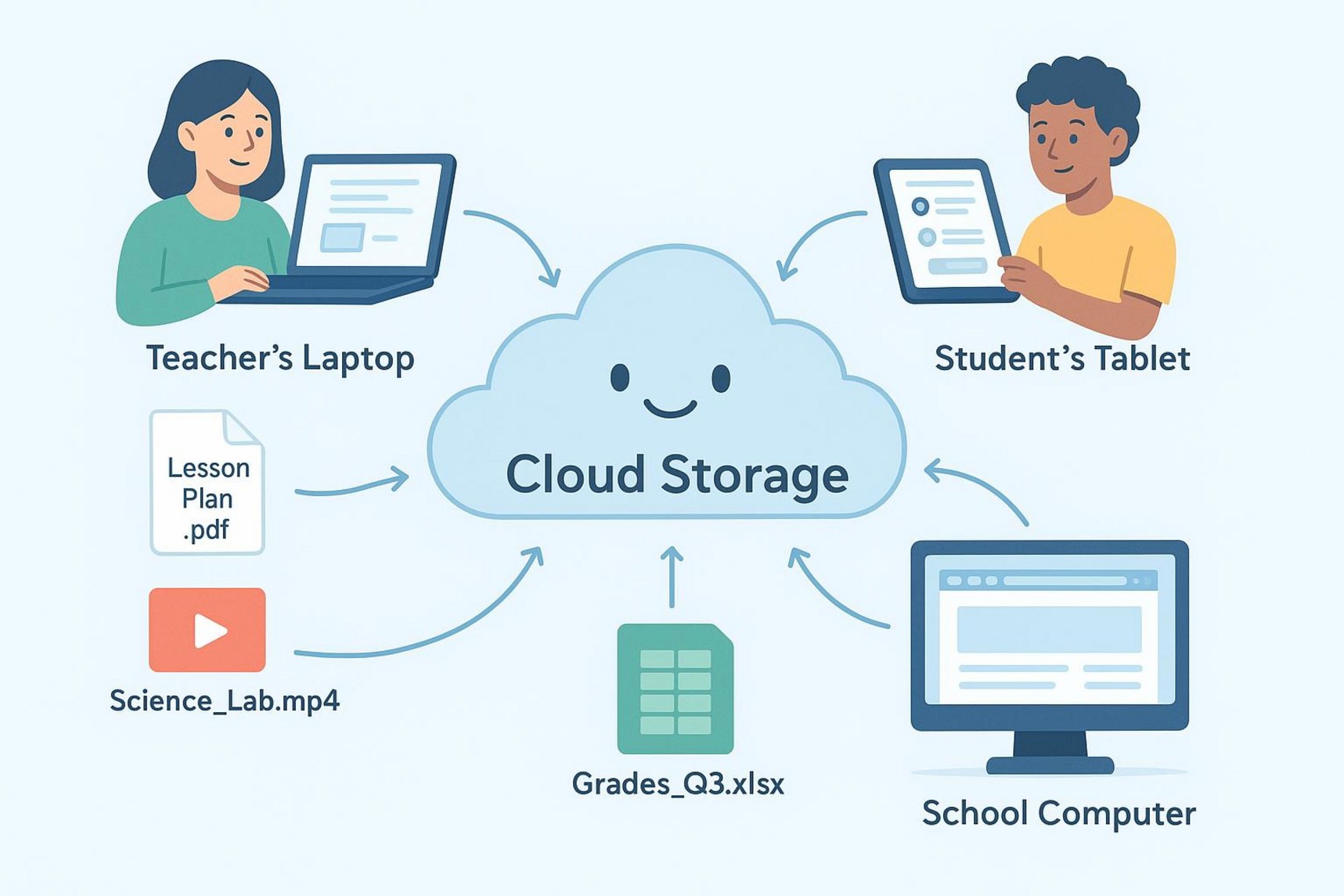
As schools use more digital tools, many people ask if cloud storage can really help teachers and students stay organized. The answer is yes. Cloud storage changes how schools handle learning materials and school files. It reduces the limits of physical devices and local drives and creates a more connected and easy-to-use system.
With online services that store, manage, and open files on the internet, schools can keep resources in one place and access them more easily, which helps day-to-day work run smoother.
This change is not just about turning paper into digital files. It’s about building a better way for schools to work. Cloud tools make it easier to share files, work together at the same time, and keep data safer. That gives teachers more time to teach instead of fixing tech problems.
From student records to lesson plans, being able to store and find files at a lower cost-often with options like free cloud storage for basic needs-can improve daily routines.
Still grading everything by hand?
EMStudio is a free teaching management app — manage your classes, students, lessons, and more!
Learn More

Still grading everything by hand?
EMStudio is a free teaching management app — manage your classes, students, lessons, and more!
Learn More
Table of Contents
Main Benefits of Using Cloud Storage in Education
Using cloud storage in education is more than a passing trend. It’s a practical choice that brings real benefits to both school operations and classroom learning. Cloud storage improves access, supports teamwork, and offers strong security features.
Over 90% of educational institutions report that cloud storage has reduced IT maintenance costs and improved collaboration more than earlier tech upgrades, showing how much impact it can have.
Anytime, Anywhere Learning and Teaching
One of the biggest benefits of cloud storage is that it removes the need to be in one place at one time. With cloud tools, learning materials can be accessed from almost any device with the internet.
Students do not have to be in a classroom or computer lab to read materials, submit work, or work with classmates. They can study at home, while commuting, or from another country. This helps students who balance school with work or family, and it can help students in areas with fewer local school resources.
For teachers, cloud storage means they can plan lessons, grade work, and share feedback from anywhere. They can upload new materials and update older ones without being tied to a single school computer.
This flexibility was especially helpful during events like the COVID-19 pandemic, when schools with cloud tools had fewer disruptions and moved faster to online learning. Cloud storage helps keep teaching and learning going even when normal routines change.
Better Collaboration Between Teachers and Students
Cloud storage can make collaboration much easier. Tools like Google Workspace, Microsoft Teams, Zoom, and Slack support real-time communication and teamwork. Teachers can share lessons and resources quickly, and students can work together on shared documents, slides, or spreadsheets at the same time. This makes group work more active and easier to manage.
For example, students can co-write a research report, leave peer comments, or brainstorm on shared boards. Teachers can check progress, step in with guidance, and join discussions while students work.
This kind of interaction also improves communication between teachers, students, and administrators, and it can reduce delays in admin tasks.
Cost Savings Compared to Traditional Storage
Cloud storage can save schools a lot of money. Moving away from local servers reduces the need for large hardware purchases and ongoing maintenance. Instead of buying servers and paying for repairs, power, cooling, and staff time, schools can pay for cloud services as a monthly expense.
For example, storing one petabyte of data on-site can cost more than $1.3 million over five years once you include equipment, upkeep, space, electricity, cooling, and staff time.
Cloud storage can provide similar capacity at a much lower cost, sometimes under 30% of a self-managed setup, depending on the service plan. These savings can go back into learning goals like new programs, student support, and updated classroom tools.
Scalability for Growing Educational Needs
Schools and universities change often. Student numbers grow and shrink, and digital content keeps increasing. Cloud systems are built to scale up or down when needed. A school can add more capacity during busy times, like the start of the year or exam season, without buying and installing more hardware.
This approach also supports fast growth in digital materials, such as student records, e-book libraries, and video lessons. Online learning systems can also handle large numbers of users at once without slowing down, as seen with platforms like Coursera.
The main idea is simple: schools can use more resources when needed and reduce them when demand drops, which avoids both system overload and wasted spending.
Eco-friendly Impact and Reduced Paper Waste
Cloud storage can also support greener school practices. Moving away from printed handouts, paper submissions, and local servers can lower a school’s overall environmental impact. Using digital textbooks, online worksheets, and cloud submissions cuts paper use, ink use, and the energy needed for printing and recycling.
Large cloud providers also often run data centers with better energy efficiency than many separate local servers. When students submit work online, they use fewer physical supplies like folders and paper. Remote learning supported by cloud tools can also reduce commuting and allow buildings to close on some days, which may lower energy use.
Increased Data Security and Reliable Backups
Data safety matters a lot in schools, especially for student and staff information. Cloud services often include security features that many schools would find hard to build on their own. Trusted providers use strong protections like encryption (for data while stored and while being sent), secure sign-ins (including multi-factor authentication), and regular security checks. These steps help protect against unauthorized access and threats like ransomware, which has become more common in education.
Cloud services also offer automatic backups. Files are backed up regularly, which reduces the risk of losing data from hardware problems, mistakes, or attacks. Some services also offer immutable storage, which blocks deletion or changes for a set time, helping defend against ransomware. Many cloud platforms also support legal requirements like GDPR and FERPA, offering tools and guidance to help schools protect privacy.
Promotes Inclusion and Accessibility
Cloud storage can help make education more inclusive. Remote access can support students in rural or underserved areas who cannot always reach a physical school. With an internet connection, they can still access learning materials and join classes, which reduces location barriers.
Cloud tools also support students with disabilities by working with assistive technology and offering flexible formats. Teachers can provide different versions of materials based on student needs, learning levels, or barriers. Students dealing with illness or anxiety can also learn in an environment that works better for them. Cloud platforms can also support personalized learning paths that match lesson delivery to progress and individual needs.
Why Cloud Storage Improves Organization in Schools
Good organization supports better teaching and smoother school operations. Cloud storage helps by moving files out of scattered personal drives and into a single system that is easier to manage. This isn’t just about being tidy. It helps schools respond faster, reduce confusion, and keep daily work running in a clear and consistent way.
Centralized Access to Educational Resources
Cloud storage improves organization by putting resources in one central location. Instead of storing files across different computers, local drives, and filing cabinets, schools can keep materials in one shared online space. Teachers, students, and admins can then find what they need faster and from one main place.
For teachers, this creates a clear digital library for lesson plans, syllabi, videos, and tests. For students, it gives one consistent spot to find readings, assignments, and lecture notes. This reduces time wasted searching for files and helps everyone use the latest version of documents, avoiding mix-ups caused by old copies.
Streamlined File Management for Classes and Departments
Cloud storage simplifies file management for classes and departments. Teachers can set up shared folders for each course or project and control who can view or edit. They can also use a clear folder layout, such as:
Lectures
Assignments
Readings
Resources
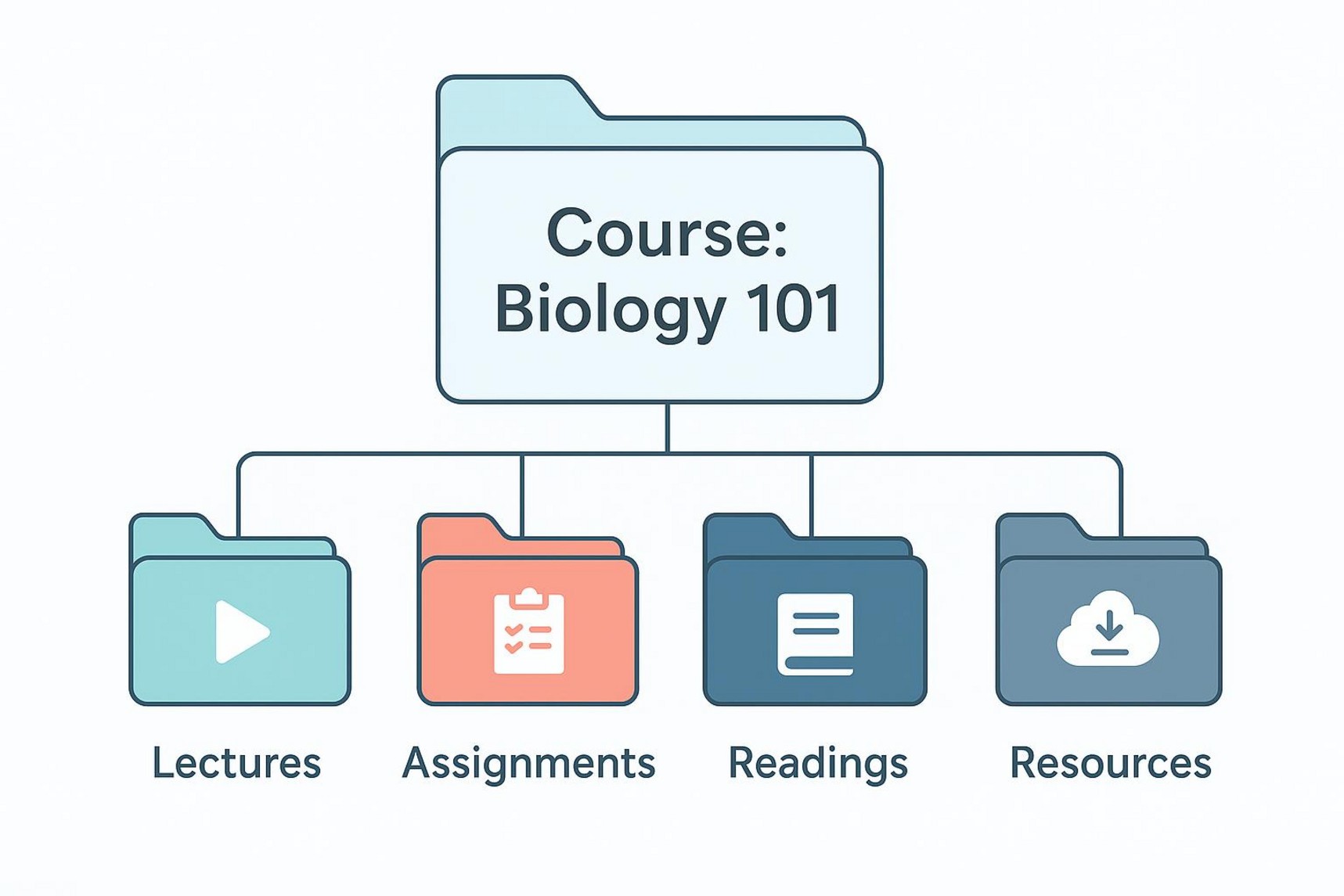
Departments can do the same for shared files like curriculum guides, meeting notes, and policy documents. This reduces clutter, lowers the chance of losing key files, and makes it easier to share materials with the right people. Some services also offer tagging and search tools that help users find files quickly even in large archives.
Automated Backups and Version Control
Cloud storage is more organized partly because backups happen automatically and version history is built in. With local storage, backups are often manual, and missed backups can lead to data loss. With cloud systems, changes can be saved right away, so users don’t lose work if a laptop breaks, a program crashes, or a file is deleted by accident.
Version control also helps in group work. It records changes so users can go back to an earlier version if needed. This is useful for student group projects and for teachers reviewing how a student’s work changed over time. Backups plus version history keep files safer and create a clear record of edits, which improves overall file control.
Key Takeaways for Teachers, Students, and Administrators
Using cloud storage in education is less about adding one more tool and more about changing how schools handle learning and admin work.
For teachers, students, and administrators, the main idea is simple: better organization, easier collaboration, and systems that can support future needs.
Actionable Steps to Improve Organization with Cloud Storage
For teachers, use the organization tools built into cloud platforms. Set up a consistent folder structure for each course, use clear file names, and use tags if available so files are easy to search. Have students submit assignments through shared folders, and use comments and version history to speed up grading and revisions. Use connected apps for lesson planning and content delivery so materials stay in one place.
Students can stay more organized by using cloud storage as their main workspace. Save notes, assignments, and projects directly to the cloud. Set up folders that match your classes and use collaboration tools for group work. Back up important personal files regularly so nothing disappears. Use the ability to access files on any device so you can study wherever you are.
For administrators, focus on safe setup and steady improvement. Move school data-like student records and operational documents-into a secure cloud system with the right permission settings. Review security policies and access lists often. Fund training and support for staff and teachers. Track usage and spending, and adjust storage plans to control costs. Rolling out new features in stages can also help staff adapt.
Maximizing Collaboration and Efficiency Across the School
To get the most value, cloud storage should be part of everyday school routines. For teachers, build collaborative tools into lessons and set up group work where students co-create and edit files in real time. Share teaching resources with other staff through shared libraries so good materials are easy to reuse.
Students should treat cloud platforms as the main place for school communication and work. Join online discussions, contribute to shared documents, and use built-in messaging tools to stay connected with classmates and teachers. Over time, this makes digital teamwork feel normal and builds communication skills that students will use later in life.
For administrators, stronger collaboration comes from promoting digital skills and shared systems. Cloud-based MIS tools can improve communication between teachers, students, and parents. Shared drives can support work between departments for planning and document sharing.
With the right support and clear routines, cloud tools can raise efficiency, improve response times, and create a more connected school experience.
Main Benefits of Using Cloud Storage in Education
Using cloud storage in education is more than a passing trend. It’s a practical choice that brings real benefits to both school operations and classroom learning. Cloud storage improves access, supports teamwork, and offers strong security features.
Over 90% of educational institutions report that cloud storage has reduced IT maintenance costs and improved collaboration more than earlier tech upgrades, showing how much impact it can have.
Anytime, Anywhere Learning and Teaching
One of the biggest benefits of cloud storage is that it removes the need to be in one place at one time. With cloud tools, learning materials can be accessed from almost any device with the internet.
Students do not have to be in a classroom or computer lab to read materials, submit work, or work with classmates. They can study at home, while commuting, or from another country. This helps students who balance school with work or family, and it can help students in areas with fewer local school resources.
For teachers, cloud storage means they can plan lessons, grade work, and share feedback from anywhere. They can upload new materials and update older ones without being tied to a single school computer.
This flexibility was especially helpful during events like the COVID-19 pandemic, when schools with cloud tools had fewer disruptions and moved faster to online learning. Cloud storage helps keep teaching and learning going even when normal routines change.
Better Collaboration Between Teachers and Students
Cloud storage can make collaboration much easier. Tools like Google Workspace, Microsoft Teams, Zoom, and Slack support real-time communication and teamwork. Teachers can share lessons and resources quickly, and students can work together on shared documents, slides, or spreadsheets at the same time. This makes group work more active and easier to manage.
For example, students can co-write a research report, leave peer comments, or brainstorm on shared boards. Teachers can check progress, step in with guidance, and join discussions while students work.
This kind of interaction also improves communication between teachers, students, and administrators, and it can reduce delays in admin tasks.
Cost Savings Compared to Traditional Storage
Cloud storage can save schools a lot of money. Moving away from local servers reduces the need for large hardware purchases and ongoing maintenance. Instead of buying servers and paying for repairs, power, cooling, and staff time, schools can pay for cloud services as a monthly expense.
For example, storing one petabyte of data on-site can cost more than $1.3 million over five years once you include equipment, upkeep, space, electricity, cooling, and staff time.
Cloud storage can provide similar capacity at a much lower cost, sometimes under 30% of a self-managed setup, depending on the service plan. These savings can go back into learning goals like new programs, student support, and updated classroom tools.
Scalability for Growing Educational Needs
Schools and universities change often. Student numbers grow and shrink, and digital content keeps increasing. Cloud systems are built to scale up or down when needed. A school can add more capacity during busy times, like the start of the year or exam season, without buying and installing more hardware.
This approach also supports fast growth in digital materials, such as student records, e-book libraries, and video lessons. Online learning systems can also handle large numbers of users at once without slowing down, as seen with platforms like Coursera.
The main idea is simple: schools can use more resources when needed and reduce them when demand drops, which avoids both system overload and wasted spending.
Eco-friendly Impact and Reduced Paper Waste
Cloud storage can also support greener school practices. Moving away from printed handouts, paper submissions, and local servers can lower a school’s overall environmental impact. Using digital textbooks, online worksheets, and cloud submissions cuts paper use, ink use, and the energy needed for printing and recycling.
Large cloud providers also often run data centers with better energy efficiency than many separate local servers. When students submit work online, they use fewer physical supplies like folders and paper. Remote learning supported by cloud tools can also reduce commuting and allow buildings to close on some days, which may lower energy use.
Increased Data Security and Reliable Backups
Data safety matters a lot in schools, especially for student and staff information. Cloud services often include security features that many schools would find hard to build on their own. Trusted providers use strong protections like encryption (for data while stored and while being sent), secure sign-ins (including multi-factor authentication), and regular security checks. These steps help protect against unauthorized access and threats like ransomware, which has become more common in education.
Cloud services also offer automatic backups. Files are backed up regularly, which reduces the risk of losing data from hardware problems, mistakes, or attacks. Some services also offer immutable storage, which blocks deletion or changes for a set time, helping defend against ransomware. Many cloud platforms also support legal requirements like GDPR and FERPA, offering tools and guidance to help schools protect privacy.
Promotes Inclusion and Accessibility
Cloud storage can help make education more inclusive. Remote access can support students in rural or underserved areas who cannot always reach a physical school. With an internet connection, they can still access learning materials and join classes, which reduces location barriers.
Cloud tools also support students with disabilities by working with assistive technology and offering flexible formats. Teachers can provide different versions of materials based on student needs, learning levels, or barriers. Students dealing with illness or anxiety can also learn in an environment that works better for them. Cloud platforms can also support personalized learning paths that match lesson delivery to progress and individual needs.
Why Cloud Storage Improves Organization in Schools
Good organization supports better teaching and smoother school operations. Cloud storage helps by moving files out of scattered personal drives and into a single system that is easier to manage. This isn’t just about being tidy. It helps schools respond faster, reduce confusion, and keep daily work running in a clear and consistent way.
Centralized Access to Educational Resources
Cloud storage improves organization by putting resources in one central location. Instead of storing files across different computers, local drives, and filing cabinets, schools can keep materials in one shared online space. Teachers, students, and admins can then find what they need faster and from one main place.
For teachers, this creates a clear digital library for lesson plans, syllabi, videos, and tests. For students, it gives one consistent spot to find readings, assignments, and lecture notes. This reduces time wasted searching for files and helps everyone use the latest version of documents, avoiding mix-ups caused by old copies.
Streamlined File Management for Classes and Departments
Cloud storage simplifies file management for classes and departments. Teachers can set up shared folders for each course or project and control who can view or edit. They can also use a clear folder layout, such as:
Lectures
Assignments
Readings
Resources
Departments can do the same for shared files like curriculum guides, meeting notes, and policy documents. This reduces clutter, lowers the chance of losing key files, and makes it easier to share materials with the right people. Some services also offer tagging and search tools that help users find files quickly even in large archives.
Automated Backups and Version Control
Cloud storage is more organized partly because backups happen automatically and version history is built in. With local storage, backups are often manual, and missed backups can lead to data loss. With cloud systems, changes can be saved right away, so users don’t lose work if a laptop breaks, a program crashes, or a file is deleted by accident.
Version control also helps in group work. It records changes so users can go back to an earlier version if needed. This is useful for student group projects and for teachers reviewing how a student’s work changed over time. Backups plus version history keep files safer and create a clear record of edits, which improves overall file control.
Key Takeaways for Teachers, Students, and Administrators
Using cloud storage in education is less about adding one more tool and more about changing how schools handle learning and admin work.
For teachers, students, and administrators, the main idea is simple: better organization, easier collaboration, and systems that can support future needs.
Actionable Steps to Improve Organization with Cloud Storage
For teachers, use the organization tools built into cloud platforms. Set up a consistent folder structure for each course, use clear file names, and use tags if available so files are easy to search. Have students submit assignments through shared folders, and use comments and version history to speed up grading and revisions. Use connected apps for lesson planning and content delivery so materials stay in one place.
Students can stay more organized by using cloud storage as their main workspace. Save notes, assignments, and projects directly to the cloud. Set up folders that match your classes and use collaboration tools for group work. Back up important personal files regularly so nothing disappears. Use the ability to access files on any device so you can study wherever you are.
For administrators, focus on safe setup and steady improvement. Move school data-like student records and operational documents-into a secure cloud system with the right permission settings. Review security policies and access lists often. Fund training and support for staff and teachers. Track usage and spending, and adjust storage plans to control costs. Rolling out new features in stages can also help staff adapt.
Maximizing Collaboration and Efficiency Across the School
To get the most value, cloud storage should be part of everyday school routines. For teachers, build collaborative tools into lessons and set up group work where students co-create and edit files in real time. Share teaching resources with other staff through shared libraries so good materials are easy to reuse.
Students should treat cloud platforms as the main place for school communication and work. Join online discussions, contribute to shared documents, and use built-in messaging tools to stay connected with classmates and teachers. Over time, this makes digital teamwork feel normal and builds communication skills that students will use later in life.
For administrators, stronger collaboration comes from promoting digital skills and shared systems. Cloud-based MIS tools can improve communication between teachers, students, and parents. Shared drives can support work between departments for planning and document sharing.
With the right support and clear routines, cloud tools can raise efficiency, improve response times, and create a more connected school experience.
Still grading everything by hand?
EMStudio is a free teaching management app — manage your classes, students, lessons, and more!
Learn More
Still grading everything by hand?
EMStudio is a free teaching management app — manage your classes, students, lessons, and more!
Learn More





Notion4Teachers
Notion templates to simplify administrative tasks and enhance your teaching experience.



2026 Notion4Teachers. All Rights Reserved.
Notion4Teachers
Notion templates to simplify administrative tasks and enhance your teaching experience.
2026 Notion4Teachers. All Rights Reserved.
Notion4Teachers
Notion templates to simplify administrative tasks and enhance your teaching experience.
2026 Notion4Teachers. All Rights Reserved.